Settings reference
Everything configurable lives in the VSK Project tab and persists automatically in the
VSKProject SaveGame slot - no config files to hand-edit. Groups below mirror the panel’s
cards.
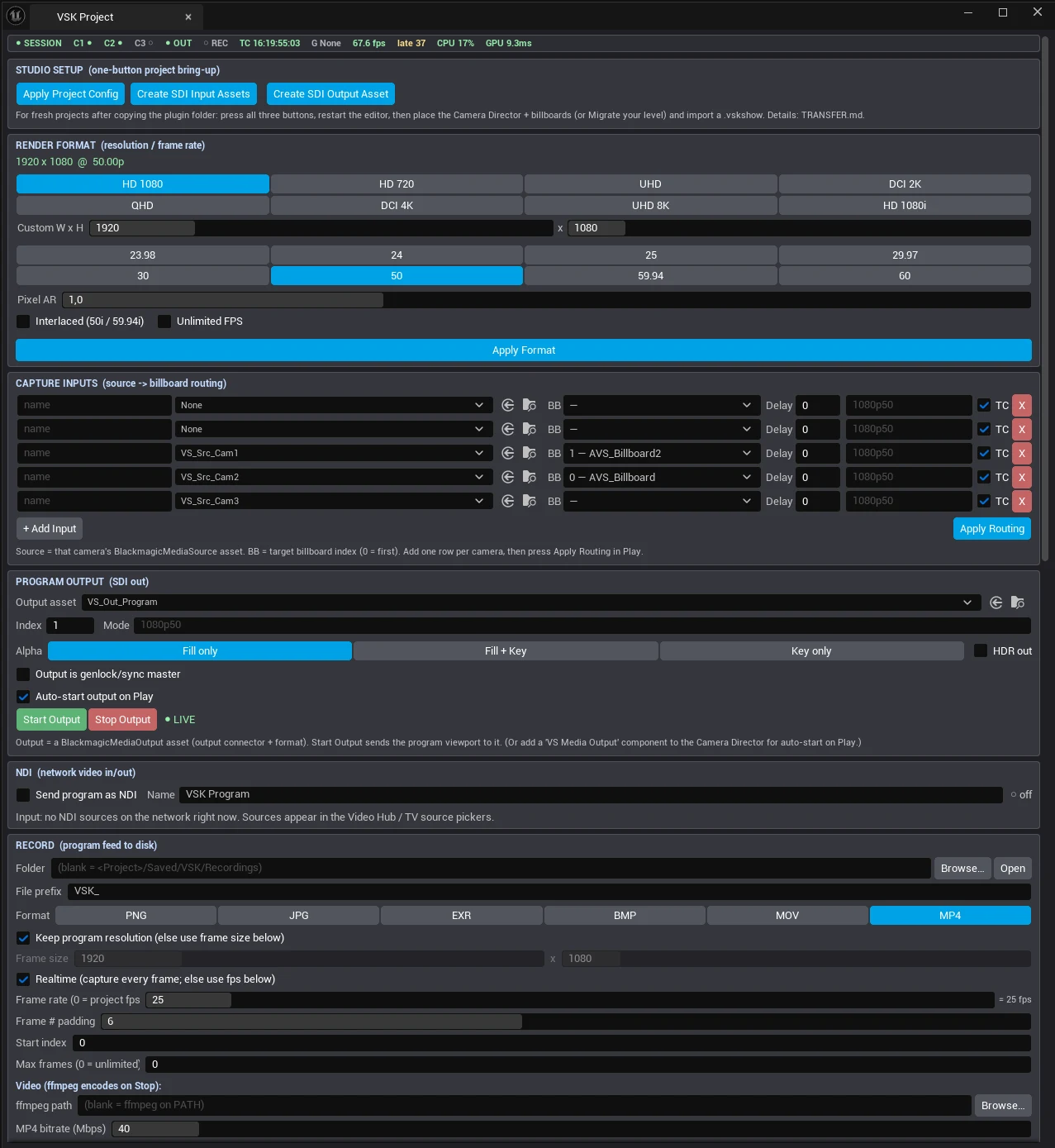
The VSK Project panel
Render format
| Setting | Default | Notes |
|---|---|---|
| Resolution X / Y | 1920 × 1080 | Program render size. Live resize while SDI is capturing is deliberately deferred. |
| Frame rate (num/den) | 50/1 | Drives output pacing, recording default and NDI send pacing. |
| Interlaced | off | Progressive recommended. |
| Unlimited frame rate | off | Uncaps the engine tick. |
| Pixel aspect ratio | 1.0 | Persists but has no runtime effect yet. |
Capture inputs
One row per camera: Name · media source path · billboard target (dropdown shows
index - label) · Delay frames (real ring buffer, lip-sync tested live) · Video mode ·
TC-sync checkbox - then Apply Routing. One media player per camera is shared by every
consumer, so re-applying routing never double-captures.
Program output
| Setting | Default | Notes |
|---|---|---|
| Output target path | /Game/VSK/Media/VS_Out_Program | BlackmagicMediaOutput asset (created by Studio Setup). |
| Output index | 1 | DeckLink device index 1-99. Auto-placed on a port no input claims. |
| Video mode | 1080p50 | Recommended mode. |
| Key/Fill | Fill only | FillAndKey / KeyOnly persist but alpha output is not wired up yet. |
| Sync master | on | Output drives engine timing (FreeRun). |
| Auto-start on Play | off | Start the SDI feed the moment PIE begins. |
| HDR | off | Persists; no runtime effect yet. |
NDI
Enable NDI output checkbox and sender name (default VSK Program), with a ● SENDING
indicator and an install hint when the NDI runtime is missing. Both settings travel in the
show file.
Web remote
Enabled (default on) · Port (default 8090) · Allow board editing from browsers -
untick this before a show to lock the boards. The panel shows the exact URL and an
open-in-browser button.
Recording
| Setting | Default | Notes |
|---|---|---|
| Directory | Saved/VSK/Recordings | Empty = default; each take gets a timestamped subfolder. |
| File prefix | VSK_ | |
| Format | MP4 | PNG · JPG · EXR · BMP · MOV (ProRes) · MP4 (H.264). |
| Use program resolution | on | Or set an explicit record resolution. |
| Record FPS | 0 = follow project | Override numerator/denominator if needed. |
| Capture alpha | off | PNG/EXR carry alpha for keyed exports. |
| JPEG quality / bitrate | 90 / 40 Mbps | Sequence quality · H.264 bitrate. |
| ffmpeg path | (PATH) | Explicit path if ffmpeg isn’t on PATH. |
| Delete frames after encode | on | Auto-cleans the intermediate image sequence. |
| Max frames / start index / padding | 0 · 0 · 6 | 0 = unlimited. |
Show file
Show name (becomes the export base name) and Include media files (default on - copies the Quick Media shelf next to the show).
Sync
Genlock source path and timecode provider path (the two hand-made Blackmagic assets), plus a drop-frame flag (persists; no runtime effect yet).
Color
OCIO config path and input/output color-space names - persisted for the future OCIO pass; conversion is not applied yet. The SDI/MP4 path is BT.709-correct today without OCIO.
Where state lives
Every subsystem persists to its own SaveGame slot under Saved/SaveGames/:
| Slot | Holds |
|---|---|
VSKProject | Everything on this page |
VSKScenes | Scene snapshots |
VSKKeyer / VSKGrounding | Per-billboard keyer & grounding values |
VSKVideoHub | Screen routing, cut banks, fades, shelf |
VSKKeyBindings / VSKControlBoards / VSKControlBus | Bindings · web boards · bus values |
VSKAudioMixer | Strips, DSP, master/monitor state |
VSK_Ch00/10/20… | Per-camera-channel presets & poses |
VSKPanelSections / VSKStyle | UI expansion state · style prefs |
All of it - plus the media shelf - rides in one .vskshow file.